Why ezCheckDraft software suddenly stopped working
Question from customer:
I have used ezCheckDraft for more than two years. But I could not start ezCheckDraft software this morning and got "ezCheckDraft stops working error". How can I fix this error?
Reason:
Windows updates might mess up user permissions or software setting.
Solution:
Please log on your computer as administrator or a user with enough permission to run ezCheckDraft, and try the solutions below.
From $295
Draft Checks Electronically In-House
ezCheckDraft: Trusted By Thousands.
Draft checks electronically
Generate ACH files for draft checks
Unlimited accounts. Unlimited transactions.
For both federal and states.
Try free DEMO today. No obligation. No credit card required. No risk.
ezCheckDraft is compatible with Windows 11, 10, 8.1, 8, 7, and other Windows system, 32-bit or 64-bit.
Solution 1: Start ezCheckDraft from program folder
We noticed some customers could not run ezCheckDraft because the desktop shortcut was broken. You can also start this check printing software from program folder
The default program folder is:
C:\Program Files (x86)\Halfpricesoft\ezCheckDraft
You can double click ezCheckDraft.exe file to run it. (If your system hides extension, you just double click ezCheckDraft). If it works, you can delete the old desktop shortcut and follow this article to create a new shortcut on desktop.
Solution 2: Create a new settings file
The default database folder is:
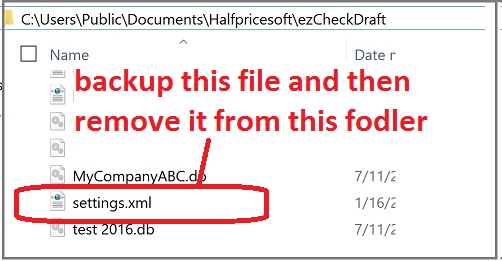
C:\Users\Public\Documents\Halfpricesoft\ezCheckDraft
Open data folder, backup settings.xml and remove it from this folder.
start ezCheckDraft again. ezCheckDraft will start in trial mode and you need to enter the key code again. (You can find the key code in your email account that you used for this order)
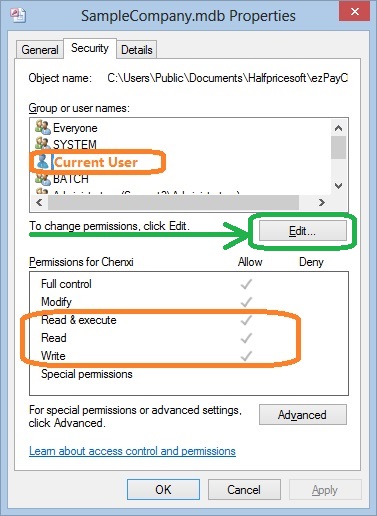
Solution 3: Give current user permission to access data
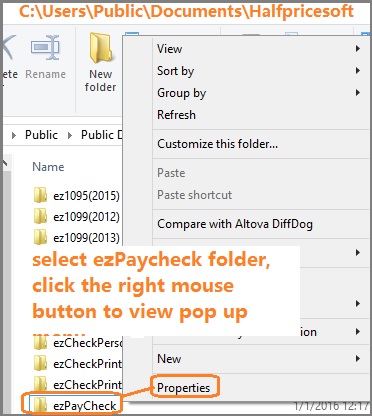
Open ezCheckDraft data folder and make sure you have enough permission to access data and run this application.
If not, we suggest full control permission (at least read, write and execute) on the following two folder.
The default database folder is:
C:\Users\Public\Documents\Halfpricesoft\ezCheckDraft
The default program folder is:
C:\Program Files (x86)\Halfpricesoft\ezCheckDraft
start ezCheckDraft again. If it does not fix this issue, continue.