HalfpricesoftHalfpricesoft


    How to customize font of a text field on bank check

    With ezCheckPrinting software, you can customize the check format easily. Followings are the steps to customize the font of a text field on bank check.

    Step 1: Start ezCheckPrinting


    free check printing software

    Design and Print Professional Checks Yourself

    - Print checks on blank stock with logo and signature
    - Fill in data on pre-printed checks
    - Print blank checks to fill in later
    - QB virtual printer for QuickBooks/Quicken(for Windows)
    - Unlimited accounts and checks for Windows and Mac.

    Try ezCheckPrinting free demo version with no obligation and no credit card needed.


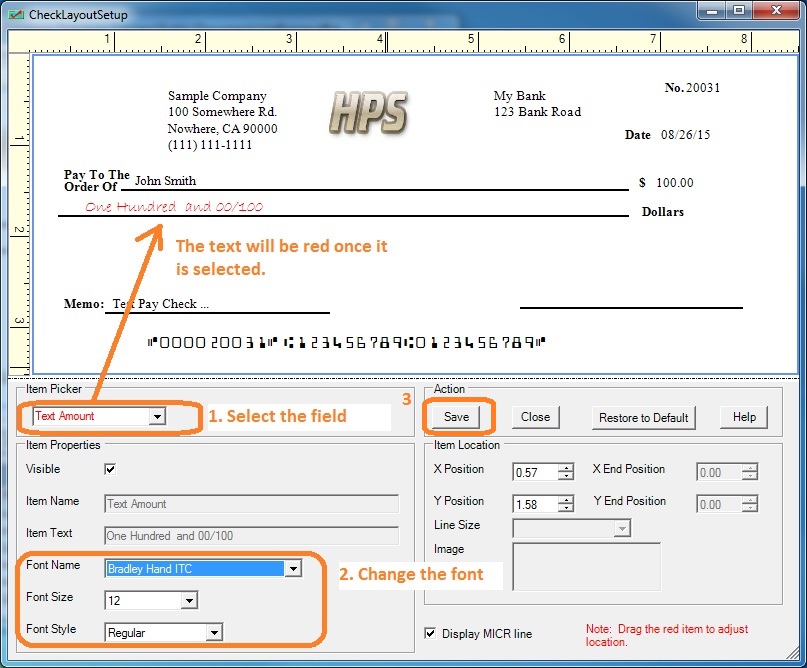
    Step 2: Click the top menu "Settings->Layout setup" to open Layout setup screen


  • Select the item from item picker list


  • Modify the font set up.


  • Click the Save button to save your changes.


  • change font

    Related Links:

  • How to print paychecks on balnk stock

  • How to print personal check on blank stock

  • How to Print QuickBooks Check on Blank stock


  • How to Print pre-printed check with MICR Encoding to fill in manually

  • How to Print check with logo

  • How to Print check with signature

  • How to print check draft to collect payment online