Check Printing Software: How to Design a Check
With ezCheckPrinting software, you can design and print professional check with logo and MICR encoding on blank stock easily in house.
1. Add a logo or a signature
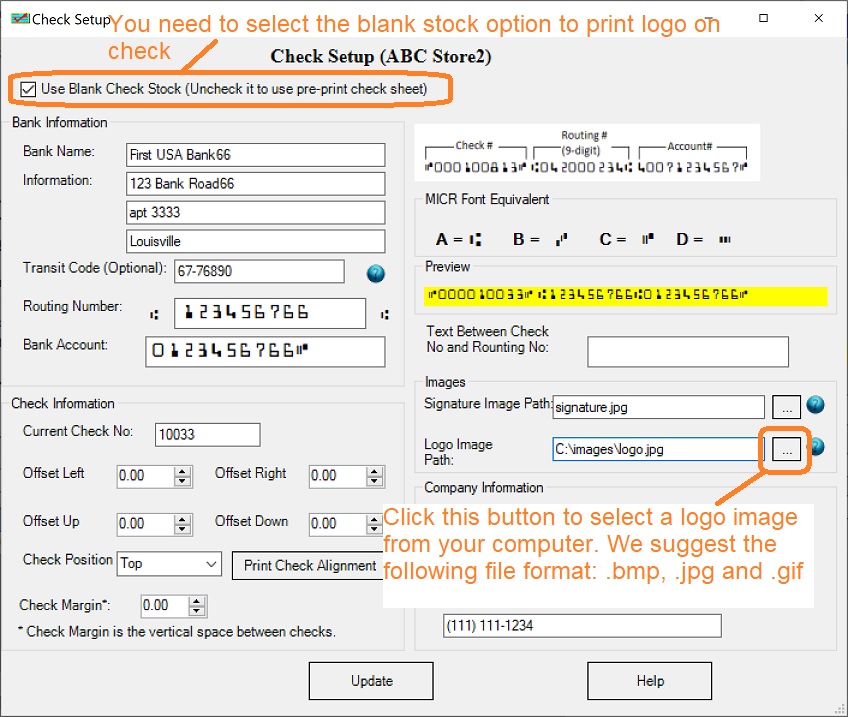
1.1 Start ezCheckPrinting, click the top menu "Settings->check setup" to open the check setup screen.
1.2 You can specify the logo image and signature image. We suggest the .bmp, .jpg, .gif format image. (Some clients reported their computers cannot .png image on Mac.)
1.3 Select the check format: top, middle, bottom or 3-per-page.
2. Customize Check Layout
Click the top menu "Settings->Layout Setup" to open the check layout page.
Logo
Signature
MICR encoding line
How to customize text fields and lines on check
Add extra text and line fields
Customize stub
Hide one field on check
2.1: Customize the logo
EzCheckPrinting allows customers to print check with logo. If you do not need logo, you can remove it from check setup screen by clicking top menu "Settings->check setup".
If you need to add a logo or customize it, you can refer to this article.
https://www.halfpricesoft.com/business_check_software/ezCheckPrinting_logo.asp
2.2: Customize the signature
EzCheckPrinting allows customers to print check with signature. If you do not need logo, you can remove it from check setup screen by clicking top menu "Settings->check setup".
How to add or remove a signature How to print check with signature How to print check with two signature line
How to create digital signature image
2.3: How to customize text fields and lines on check
You can change the label location, font type, font size, font color and other properties. You can refer to this artilce to get more details.
How to customize text field on check
2.4: How to add new text fields and new lines on check
With ezCheckPrinting, you can add up to three new text fields and three new lines on check.
How to add a new line
How to print a check with two signature lines
How to add a new text field (ie: "void after 60 days")
How to print a void check
2.5: How to customize MICR encoding line
How to customize MICR line with extra space and symbol(s)
How to hide MICR line
How to adjust MICR line printing position
2.6: Customize Font
How to customize font of a text field on bank check 2.7: How to print the check higher or lower
How to print the check higher or lower
 | Design and Print Professional Checks Yourself
- Print checks on blank stock with logo and signature
- Fill in data on pre-printed checks
- Print blank checks to fill in later
- QB virtual printer for QuickBooks/Quicken(for Windows)
- Unlimited accounts and checks for Windows and Mac.
Try ezCheckPrinting free demo version with no obligation and no credit card needed.
|
Related Links:
How to print paychecks on blank stock? How to print personal check on blank stock? How to print QuickBooks check on blank stock? How to print pre-printed blank check with MICR encoding to fill in manually? How to print checks with logo? How to print check draft to collect payment online or by phone? Why my bank cannot scan my check? Do I need special printer to print checks? 
