How to Print Blank Check on a Mac Computer
Click here to view
How to print blank check on a Windows computer 
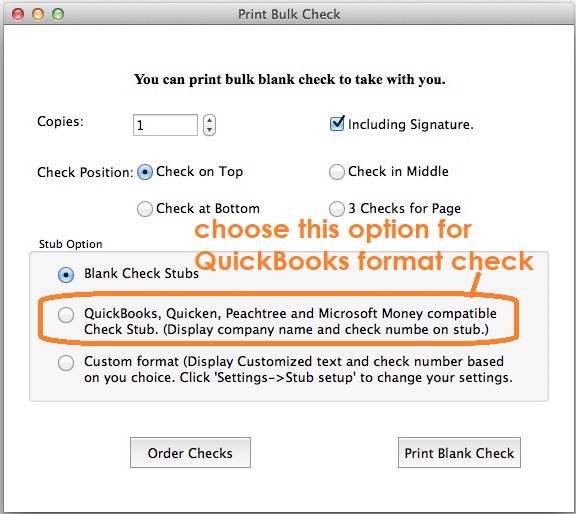
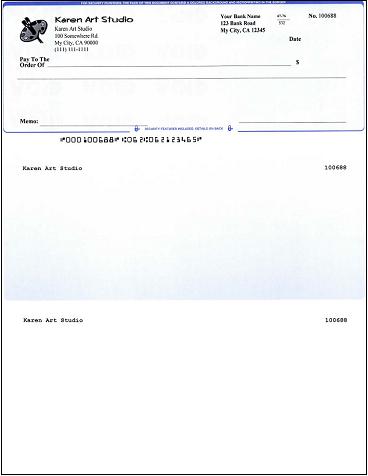
ezCheckPrinting check writing software for Mac saves your time and money on checks. Writing a check on a Macintosh machine is so easy. Here is the step by step guide on how to print QuickBooks compatible checks that you can fill in manually or by other software.
PlayStep 1: Start ezCheckPrinting cheque writer On Mac computer
Click the top menu "Print Checks", then click "Print Blank Check" sub menu to open print blank check screen

Step 2: Print blank checks to fill in later
Choose your print option and click "Print Blank Check" button to print checks
You are welcome to download and try ezCheckPrinting Software. No registration needed and no obligation.
 | Design and Print Professional Checks Yourself- Print checks on blank stock with logo and signature
- Fill in data on pre-printed checks
- Print blank checks to fill in later
- QB virtual printer for QuickBooks/Quicken(for Windows)
- Unlimited accounts and checks for Windows and Mac.
Try ezCheckPrinting free demo version with no obligation and no credit card needed.
|
Related Articles:

