Payroll Software for Church: How to Handle Housing Allowance
A minister's housing allowance, sometimes called a parsonage allowance or a rental allowance is excludable from gross income for income tax purposes.
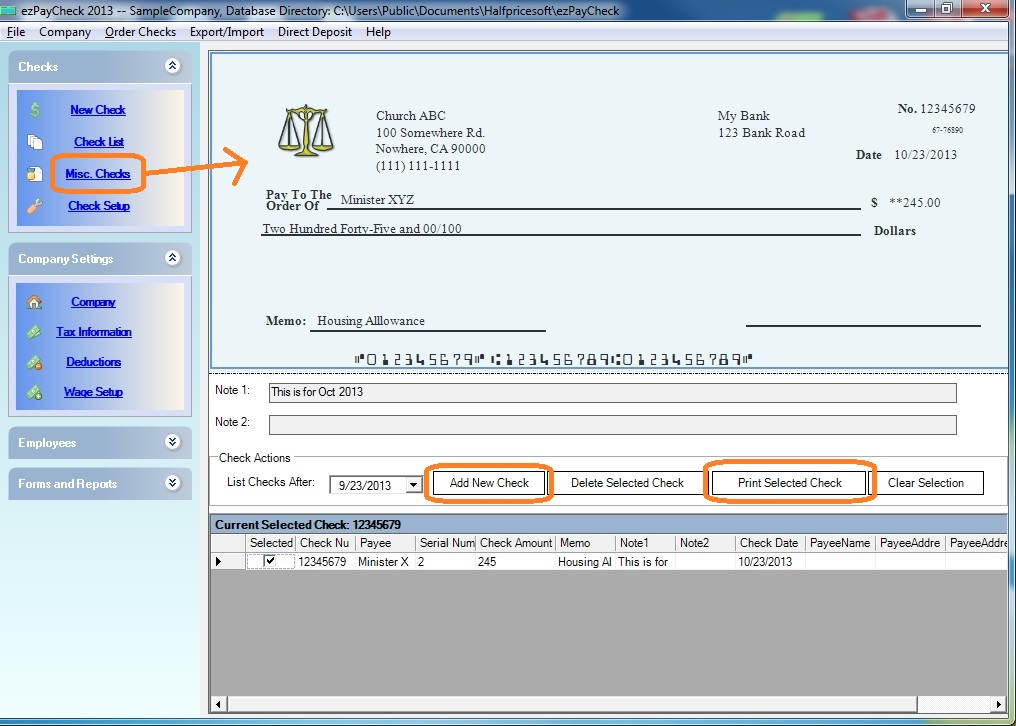
With ezPaycheck payroll software, you can use the MISC check feature to handle the payment for house allowance easily.
Print MISC check for housing allowance
- Start ezPaycheck payroll software
- Click the left menu "Checks", then click "MISC check".
- Click the "Add New Check" button to add a new check
No income taxes will be withheld from the MISC checks. You can also this MISC check feature to pay employees non-taxable reimbursements or pay your vendors.
Click the image to view bigger one
W2 report for Housing Allowance
You can enter the housing allowance payment to W2 box 14 when you file the year-end return. If you have any questions, you can contact your local IRS office.
How to file W2 formRalated Article
Click here to view
how to set up the tax option for clergy member who do not need pay FICA tax

From $169 | ezPaycheck Makes Payroll An Easy, In-House Task!(For Windows and Mac)
- Trusted by Thousands for Two decades.
- Calculate Federal & State Taxes, Print Paychecks, Print W2, W3, 941, 943 and 940.
- User-friendly, Easy-to-use
- No monthly fee.
Act now: automate your small business payroll today.
Try it free for 30 days with no obligation. No credit card required.
|
ezPaycheck Quick Start GuideHow a add a new company accountHow to handle both employees and contractorsHow to handle restaurant tipsHow to add a custom deduction and withhold it from each paycheck automaticallyHow to handle local taxesHow to handle State Disability Insurance (SDI)How to print paycheck in different formats: check-on-top, check-in-middle, check-at-bottom or 3-per-pageHow to print paycheck on blank stockHow to print paycheck on pre-printed checksHow to print paycheck with company logoHow to adjust check printing positionSample PaychecksDetermine a Company's Name for e-Filing
