ezPaycheck Payroll Software: How to Read .mdb Database File
The database file of ezPaycheck payroll software is .mdb file. You should
NOT open database file manually or with Microsoft Access. You can open the file with ezPaycheck software.
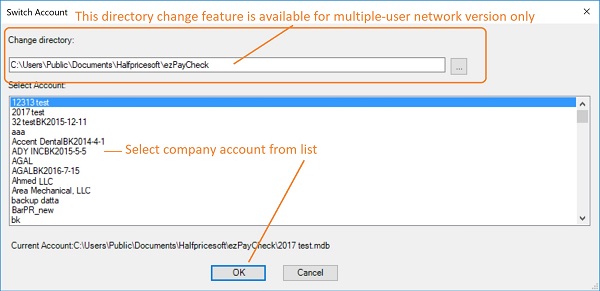
1. If this file is in data folder, you can switch the current account to view data The default data folder for ezPaycheck is
C:\Users\Public\Documents\Halfpricesoft\ezPaycheck
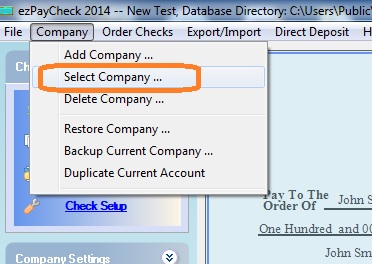
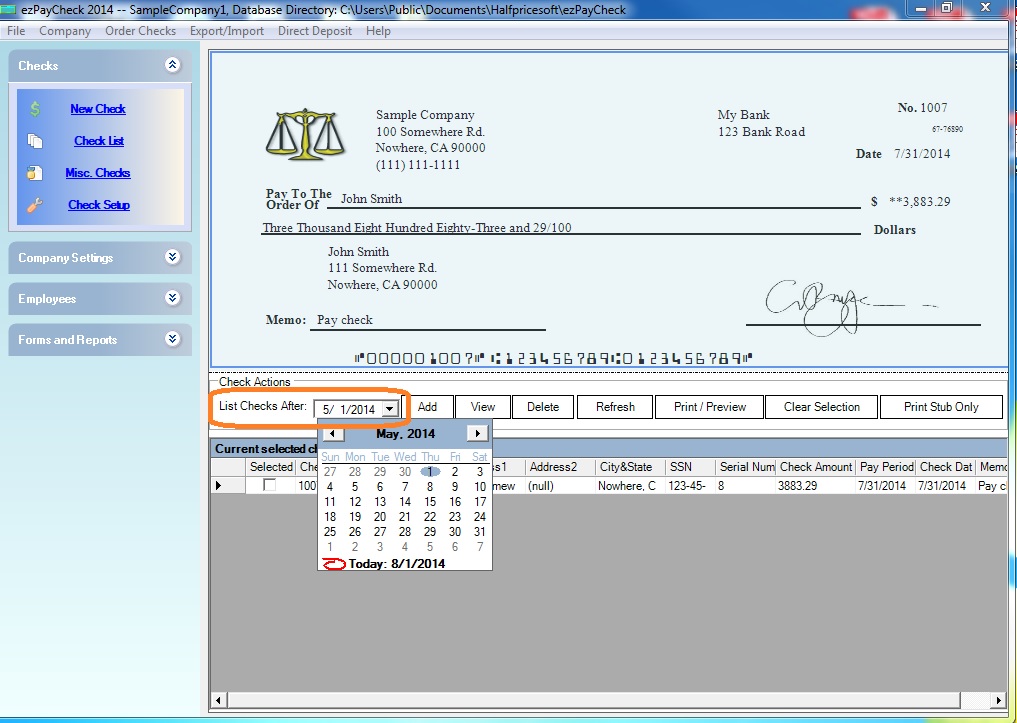
You can click ezPaycheck top menu "Company" then "Select Company" to change the current to view the database file. After you switch the account, you can change date of
List Checks After field, which is above the paycheck list, to view more data.
How to switch the current account
2. If this .mdb file is in USB or backup folder or server or other folder, you can use database restore function to copy the file to the data folder. Then you can switch the current account to read the data.
How to restore data

From $159
(Regular $189) | ezPaycheck Makes Payroll An Easy, In-House Task!(For Windows and Mac)
- Trusted by Thousands for Two decades.
- Calculate Federal & State Taxes, Print Paychecks, Print W2, W3, 941, 943 and 940.
- User-friendly, Easy-to-use
- No monthly fee.
Switching Payroll? Get ezPaycheck 2026 + 2027 Together & Save
Try it free for 30 days with no obligation. No credit card required.
|

