ezPaycheck Payroll Software: Safety Issue
In house DIY
ezPaycheck payroll software automates tax calculations and paycheck printing. It is safe to process payroll with ezPaycheck.
1. Is internet connection required to run ezPaycheck?
No.
2. Can halfpricesoft.com access my payroll data?
No, we cannot access your data without your permission. ezPaycheck is the desktop version and the payroll data is saved on your computer. You have full control of your data.
We can remotely access your data during trouble shooting when you request remote access support and give us the permissions.
3. Why doesn't ezPaycheck support password protection?
ezPaycheck payroll software is the desktop version. We believe the current Windows security is sufficient for our clients.
You can lock your computer automatically when you are away from your desk
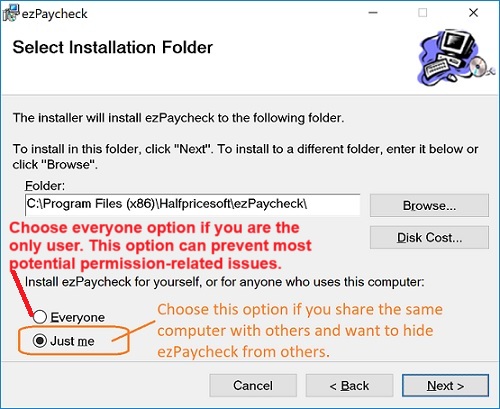
If you share the same computer with other people, you can choose "Just me" option when you install ezPaycheck. So other people will not see it when they log in with a different user ID.
4. Does ezPaycheck come with data backup and restore feature?
Yes, you can backup and restore data with a few clicks. We suggest our clients to back up data to the USB disk, the server or other location regularly. If your computer is crashed, you can restore data easily. You can learn more about
ezPaycheck data backup and restore here.

From $159
(Regular $189) | ezPaycheck Makes Payroll An Easy, In-House Task!(For Windows and Mac)
- Trusted by Thousands for Two decades.
- Calculate Federal & State Taxes, Print Paychecks, Print W2, W3, 941, 943 and 940.
- User-friendly, Easy-to-use
- No monthly fee.
Switching Payroll? Get ezPaycheck 2026 + 2027 Together & Save
Try it free for 30 days with no obligation. No credit card required.
|
Related Links:
ezPaycheck Quick Start GuideHow a add a new company accountHow to handle both employees and contractorsHow to handle restaurant tipsHow to add a custom deduction and withhold it from each paycheck automaticallyHow to handle local taxesHow to handle State Disability Insurance (SDI)How to print paycheck in different formats: check-on-top, check-in-middle, check-at-bottom or 3-per-pageHow to print paycheck on blank stockHow to print paycheck on pre-printed checksHow to print paycheck with company logoHow to adjust check printing positionSample PaychecksDetermine a Company's Name for e-Filing

