HalfpricesoftHalfpricesoft


    ezPaycheck Payroll Software: How to Generate Report by Pay Period Ending Date or by Check Issue Date


    Download Now>  Buy Now


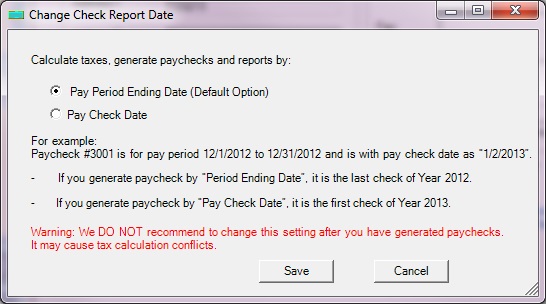
    ezPaycheck generates paychecks and report by pay period ending date by default. However, customers can change the option to generate the report by Pay Date.

    For example: Paycheck #30001, for pay period 12/16/2025 to 12/31/2025 paid on 1/2/2026

    If you select to generate the report by Pay period Ending Date, paycheck #30001 is the last check of year 2025 and will be displayed on Year 2025 report.

    If you select to generate the report by Pay Date, paycheck #30001 is the first check of year 2026 and will be displayed on Year 2026 report.
    How to change the payroll report option

    Step 1: Start ezPaycheck payroll software and backup your data first

    You can learn more about database backup and restore here

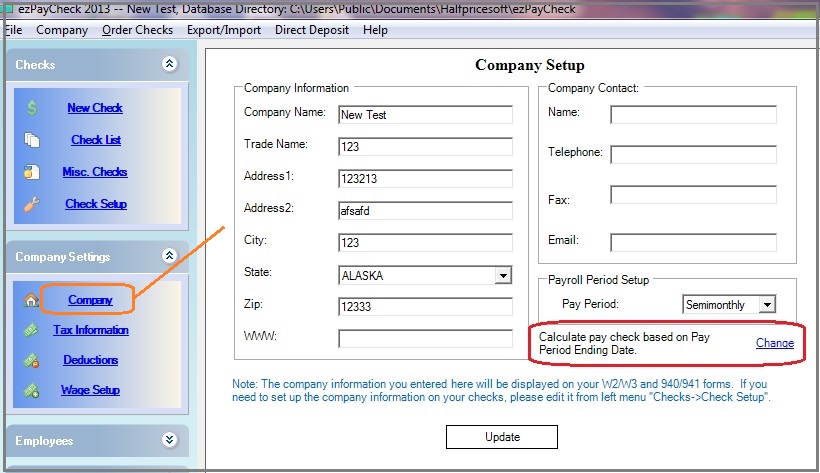
    Step 2: Click the left menu "Company Settings" then click sub menu "Company" to view company setup.


    Step 3: Click the "change" link behind current report option field to change the set up.

    setup paycheck
    (Click image to enlarge)

    Step 4: Change report option

    payroll report option


    payroll software
    From $159
    (Regular $189)

    ezPaycheck Makes Payroll An Easy, In-House Task!

    (For Windows and Mac)

    • Trusted by Thousands for Two decades.
    • Calculate Federal & State Taxes, Print Paychecks, Print W2, W3, 941, 943 and 940.
    • User-friendly, Easy-to-use
    • No monthly fee.

    Switching Payroll? Get ezPaycheck 2026 + 2027 Together & Save

    Try it free for 30 days with no obligation. No credit card required.


    Related Links:

  • ezPaycheck Quick Start Guide


  • How a add a new company account

  • How to handle both employees and contractors

  • How to handle restaurant tips

  • How to add a custom deduction and withhold it from each paycheck automatically

  • How to handle local taxes

  • How to handle State Disability Insurance (SDI)

  • How to print paycheck in different formats: check-on-top, check-in-middle, check-at-bottom or 3-per-page

  • How to print paycheck on blank stock

  • How to print paycheck on pre-printed checks

  • How to print paycheck with company logo

  • How to adjust check printing position

  • Sample Paychecks

  • Determine a Company's Name for e-Filing