How to Print QuickBooks Checks on Blank Stock When QuickBooks Is Installed on Server
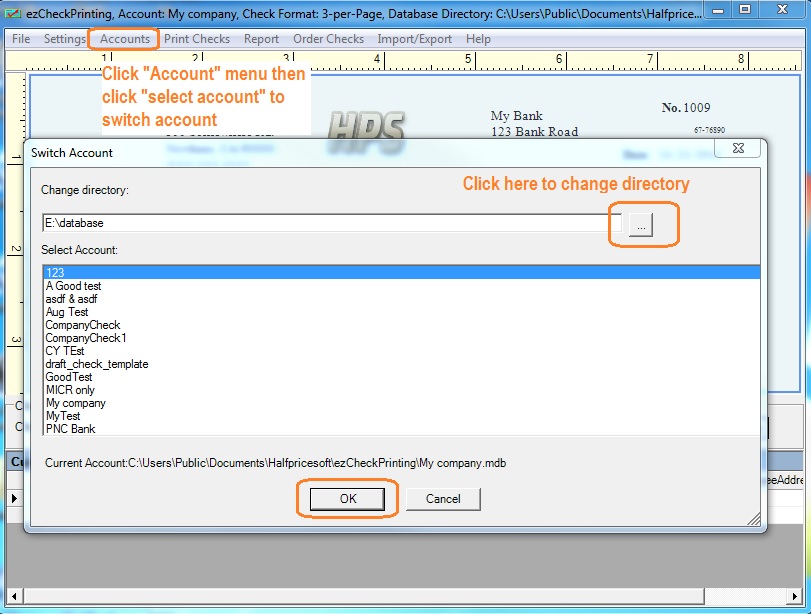
ezCheckPrinting's blank stock printing feature saves custmers time and money. With ezCheckPrinting QuickBooks version, QuickBooks customers can print checks on blank stock easily no matter QuickBooks is stalled on local machine or remote server.
3. If you can print QuickBooks check as administator, you can remotely access the server as a common client user and print QuickBooks checks.
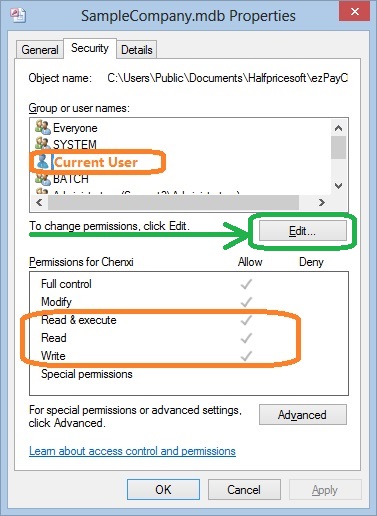
Each client should enough permissions(read, write and execute permissions) to access ezCheckPrinting application and database file on server.
Note:
When you share the folder and database file on the server, please give FULL CONTROL permission (or at least Read, Write and Execute Permissions) to ezCheckPrinting users.
How can I know I have enough permission to access the database on the server
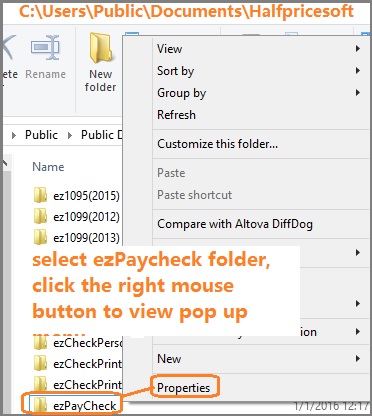
- Open Windows Explore, navigate to the database folder on the server
- Select the database file by mouse, right click to view properties. You need to have read, write and execute permisson.
ezCheckPrinting for QuickBooks allows QuickBooks users to print checks on blank stock with MICR encoding and logo in house. You can also use it to fill out preprinted blank checks also.
If you have not installed this software, you can download and try it free with no obligation and no credit card needed.
ezCheckPrinting for QuickBooks is compatible with Windows 11, 10, 8.1, 8, 7, Vista, XP and other Windows computers.