ezCheckPrinting Mac: User Interface
Click to view
Windows Version 
ezCheckPrinting is the easy-to-use business printing software for all size business. With this MAC version check writer, you canprint checks on blank stock and pre-printed checksprint blank checks with MICR encoding line to fill in manually or by Quicken, QuickBooks, Peachtree, Microsoft Money and other software. print draft checks to receive payment by fax, email and online
If you are a new client and please follow this Quick Start Guide to set up account and print checks. Quick Start GuideContinue to explore more features
Main screen
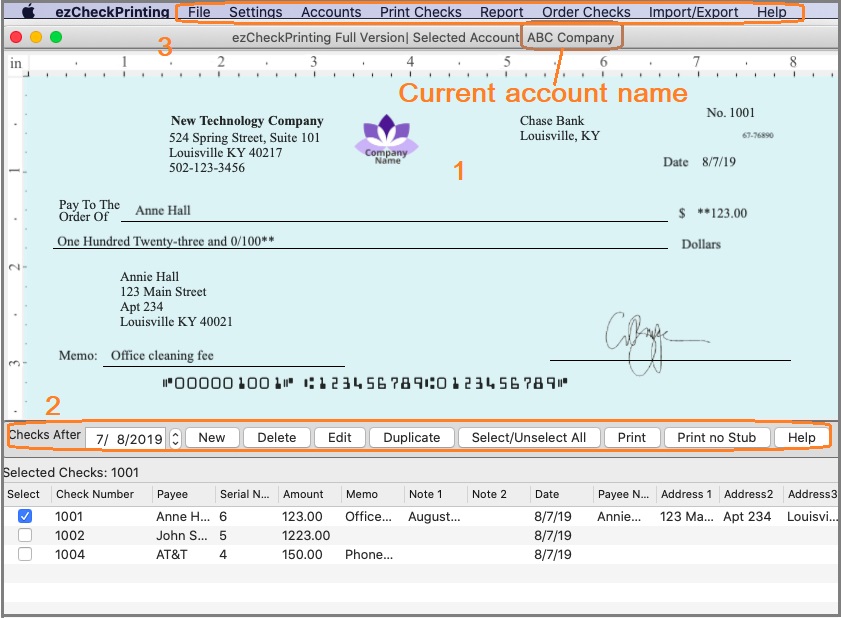
1. Preview Checks
You can select a check from list and preview it on screen.
How to set up account, add and print a checkHow to customize check layout2. Buttons
2.1
New:
Add a new check2.2
Delete: Select check(s) from list and delete
2.3
Edit:
Select a check from list and edit2.4
Duplicate:
Select a check from list and duplicate it2.5
Select/Unselect All: Select all checks to print or delete, or clear all selections.
2.6
Print: Select check(s) from list and print
2.7
Print No Stubs: Select check(s) from list and print checks with no stubs
3. Top Menu List
3.1 File- Exit: Click to exit ezCheckprinting.
3.2 Settings
-
Check Setup: Checking account set up, check paper format selection, printing alignment
-
Layout Setup: Customize check layout (ie: hide one field, change font size, font style and more)
-
Stub Setup: Customize check layout(ie: hide one field, change font size, font style and more)
3.3 Accounts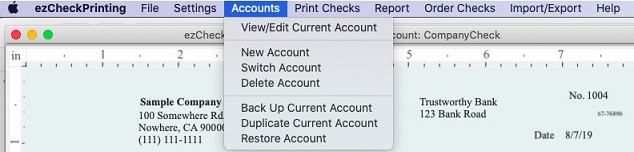
- Edit/View Current Account
-
New Account: Add a new bank account
-
Switch Account: Switch the current account
-
Delete Account-
Backup Current Account-
Duplicate Current Account: You can use this feature to add a new account by duplicating the current account.
-
Restore Account3.4 Print
-
Print Blank Checks: Print pre-printed blank checks to fill in manually or by other software
- Print Selected Check: Print the check(s) selected from check list. It works the same as the PRINT button.
3.5 ReportYou can click this menu to view report.
3.6 Order ChecksYou can click this menu to order the blank check stock from our site.
3.7 Import/Export
- Import checks:
Import check data from .csv file- Export to .csv file:
Export check data to .csv file3.8 Help
- About ezCheckPrinting: Click to view the version number.
- Quick Start Guide: Click to view quick start guide
- FAQs: Click to view FAQs
- Troubleshooting: Click to view common issues and solutions
 | Design and Print Professional Checks Yourself- Print checks on blank stock with logo and signature
- Fill in data on pre-printed checks
- Print blank checks to fill in later
- QB virtual printer for QuickBooks/Quicken(for Windows)
- Unlimited accounts and checks for Windows and Mac.
Try ezCheckPrinting free demo version with no obligation and no credit card needed.
|
Related Articles:

