
Halfpricesoft Halfpricesoft

How to Reinstall the QuickBooks Virtual Printer from Scratch

Never order expensive pre-printed blank checks for QuickBooks. With ezCheckPrinting software and QuickBooks virtual printer, you can save money by printing checks on blank stock easily.

Follow this guide to reinstall virtual printer from scratch.


1. Log in your computer as administrator

You need to have administrator permissions to install printer driver. If you are not administrator of your computer, ask your IT for help.


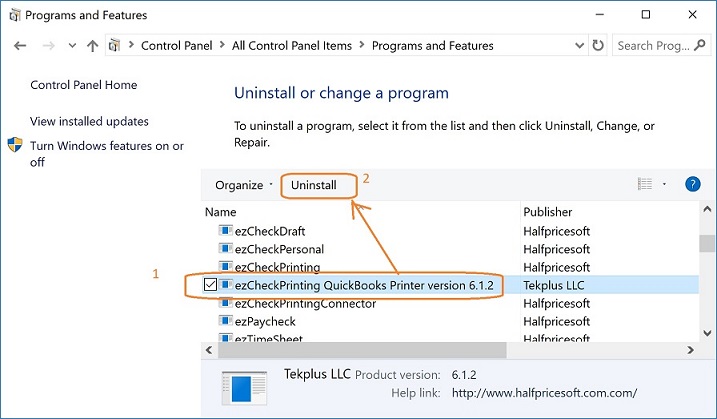
2. Uninstall the ezCheckPrinting QuickBooks Printer if it was previously installed.

Open Programs and Features by clicking the Start button , clicking Control Panel. Select EzCheckPrinting QuickBooks Virutal Printer from program list, and then click Uninstall.


3. Remove these two folders

C:\Program Files (x86)\Halfpricesoft\ezCheckPrinting QuickBooks Printer
and
C:\Users\Public\Documents\Halfpricesoft\ezCheckPrintingQBImport


4. Download and install ezCheckprinting QuickBooks Virtual Printer again

  • Download latest version
  • https://www.halfpricesoft.com/business_check_software/quickbooks_virtual_printer_download/

  • Download previous version
  • https://www.halfpricesoft.com/download.asp#virtual


    5. Follow the guide below step by step to print checks after you see ezCheckPrinting QuickBooks Driver from printer list

  • How to print QuickBooks checks on blank stock

  • How to print Quicken checks on blank stock


  • More information:

    Virtual printer installation issues and solutions

    How to reinstall ezCheckPrinting from scratch?


    QuickBooks check printing software ezCheckPrinting for QuickBooks allows QuickBooks users to print checks on blank stock with MICR encoding and logo in house. You can also use it to fill out preprinted blank checks also.

    If you have not installed this software, you can download and try it free with no obligation and no credit card needed.

    ezCheckPrinting for QuickBooks is compatible with Windows 11, 10, 8.1, 8, 7, Vista, XP and other Windows computers.
